Oct 12, 2026Supplement Labels
What File Formats Do You Accept for Supplement Label Printing?
For supplement label printing, editable vector files are preferred, but high-resolution images may also work after our artwork team prepares them.
When a customer moves from quotation to the order stage, one of the most common questions we receive is:
“What file format should I send for supplement label printing?”
Because your supplement labels will be printed based on the artwork you provide, we need a file that can be properly prepared for production.
In simple terms, the best option is an editable vector file. If that is not available, a high-resolution image may also work in some cases.
Why Do We Prefer Editable Artwork?
Before starting label printing, we usually need to make some production adjustments to the artwork so that it works correctly with our printing and finishing equipment.
For example, a designer may not leave enough bleed around the edge of the label.
If the artwork goes directly into production without enough bleed, even a small cutting tolerance during die cutting may leave an unwanted white edge or create an inaccurate final appearance.
An editable file allows our artwork team to make the necessary adjustments before production.
We may also make minor technical changes to reduce potential printing or cutting problems while keeping the original design intention unchanged.
What File Formats Do We Accept?
For custom supplement labels, editable files are always preferred.
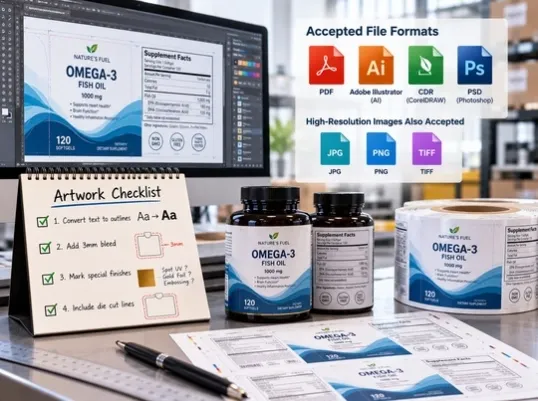
Common file formats we can work with include:
- Adobe Illustrator files
- CDR / CorelDRAW files
- PSD / Photoshop files
If you have one of these editable formats, it will usually make the prepress process faster and easier.
What If You Cannot Provide an Editable Vector File?
Sometimes customers cannot obtain the original editable artwork from their designer.
In that case, a high-resolution image may still be usable.
For example, depending on the artwork, we may be able to work with a high-quality:
- JPG
- PNG
Our artwork team can review the file and determine whether the resolution and quality are sufficient for custom label printing.
If we need to rebuild or adjust part of the artwork, we will prepare the production version first and send it to the customer for approval before printing.
We will not simply modify the design and send it directly into production without confirmation.
1. Convert All Text to Outlines
This is one of the most important artwork preparation steps.
Before sending the final file, ask your designer to convert all fonts to outlines, sometimes called converting text to curves.
Why?
If the artwork uses a font that is not installed on our computer, the software may replace it with another font automatically.
That can completely change the appearance of your label.
By converting text to outlines, the letters become vector shapes rather than editable font characters.
This ensures that the text appears exactly as your designer intended.
A Better Way to Send Artwork
If possible, we recommend sending two versions:
- one file with all text converted to outlines
- one editable version with the original text still available
Some customers already provide their label artwork this way, and it can significantly reduce communication time before printing.
2. Add Bleed to the Artwork
Your artwork should also include bleed.
For many projects, we normally recommend approximately 3 mm of bleed around the cutting edge.
During die cutting, there can always be a small amount of production tolerance.
Bleed extends the background color or image beyond the final cut line so that a minor cutting variation does not create a visible white edge.
This is particularly important for labels with full-color backgrounds or graphics that extend to the edge.
3. Clearly Mark Any Special Finishing
If your custom labels include special finishing, it should be clearly marked in the artwork.
For example:
- foil stamping
- spot UV
- embossing
- special varnish
- other decorative effects
Some designers use a special color layer to indicate where a finishing process should be applied.
That is useful, but we recommend going one step further.
Please also add a clear note explaining what that color represents.
For example:
Gold color layer = gold foil stamping
or
Pink layer = spot UV
This prevents misunderstanding.
If a special color appears in the file without an explanation, there is a risk that it may be treated as part of the printed artwork rather than a production instruction.
4. Clearly Mark the Die-Cut Line
The cutting line should also be clearly identified in the artwork.
This is particularly important for:
- custom shaped labels
- die cut labels
- labels with windows
- unusual label structures
The die line is a production guide and normally should not be printed as part of the final artwork.
If the cutting line is not clearly identified, there is a risk that it may be mistaken for a printed design element.
A clear print-ready artwork file should distinguish between:
- artwork to be printed
- finishing layers
- die-cut lines
- other production guides
Good Artwork Can Save a Lot of Time Before Printing
A well-prepared file does more than make the designer's job easier.
It can also:
- reduce back-and-forth communication
- reduce the risk of font problems
- prevent cutting issues
- make special finishing instructions clearer
- shorten the prepress process
- help avoid production mistakes
For supplement label printing, the artwork is the starting point of the entire production process.
The clearer and more complete the file is, the smoother the rest of the order will usually be.
What If You Are Not Sure Whether Your File Is Print-Ready?
Send it to us.
You do not need to determine everything yourself before contacting us.
Our team can check the artwork first and let you know whether the file is suitable for printing or whether anything needs to be adjusted.
If changes are required, we can prepare the production artwork and send it back to you for approval before printing begins.
Related Custom Label Solutions
Looking for custom labels for your products? Explore our label printing solutions:
For supplement label projects, we can also review your artwork before production and help identify any issues with bleed, fonts, die lines, or special finishing instructions.
Custom Labels for Different Order Volumes
AsiaBees provides custom label printing for both small and large production runs. We support different label materials, sizes, finishes, artwork requirements, and printing needs for brands across a range of industries.
Need Help With Your Custom Labels?
If you are preparing artwork for supplement labels and are not sure whether your file is ready for printing, send it to us for review.
We can check the file format, resolution, bleed, fonts, die lines, and finishing instructions before production.